Cloud-based games are video games that run on remote servers instead of a player's device. The server does the processing and rendering, then streams the game’s video and audio to the player’s screen. The player's inputs are sent back in real time, similar to how a video streaming service works.
The Benefits of Building Cloud-Based Games with Unity
Rick Heicksen - Director of Sales | October 10, 2026
Key Takeaways:
- Cloud-based game development removes the hardware barrier. Games run on remote servers and stream to any device.
- Unity's own cloud tools, such as Multiplay, Cloud Code, Cloud Save, and Cloud Content Delivery, handle server hosting, backend logic, and content updates.
- The real challenges include latency, cost control, protecting player data and APIs, and scaling under real traffic spikes. This is exactly why the right development partner matters as much as the engine.

Video games used to live and die by hardware. If a player's console or PC couldn't handle your game, they simply couldn't play it. That constraint is gone.
Cloud game development has changed what "shipping a game" means. It supports real-time game experiences, backend operations, multiplayer functionality, game development, and testing using cloud infrastructure and services. Cloud providers such as AWS, Google Cloud, and Microsoft Azure take care of the demanding processing. So, there is no need for players to have their own powerful hardware. The game is directly streamed to the player's device.
The shift toward cloud infrastructure is not limited to gaming. Gartner forecasts that worldwide IT spending will reach $6.37 trillion in 2026, with infrastructure-as-a-service (IaaS) among the fastest-growing segments as organizations invest more heavily in cloud platforms and AI infrastructure.
The actual question isn't only whether you can develop a cloud-based game. It is a question of how to enable a cloud-based strategy that helps you create faster, scale smarter, and deliver the experiences your players want. From cooperative development to live game updates, you may support anything by combining cloud infrastructure with Unity's game creation capabilities.
So, what does Unity bring to cloud-based game development, and where can your studio gain the most value? Let's explore the key benefits.
What Is Cloud-Based Game?
A cloud-based game is a type of game that relies on cloud technology to manage various services that aid in gameplay. Instead of utilizing the player's device, tasks like rendering, physics calculations, AI functions, and matchmaking are predominantly carried out on external servers.
The player's display merely shows a video feed and relays input back, similar to how Netflix streams content without requiring you to download it.
This matters for three reasons:
No hardware ceiling
A phone can run a game that would normally need a gaming PC.
Instant access
No downloads, no patches to wait through, no install size to worry about.
One build, many devices
The game logic lives on the server, so the experience stays consistent across platforms.
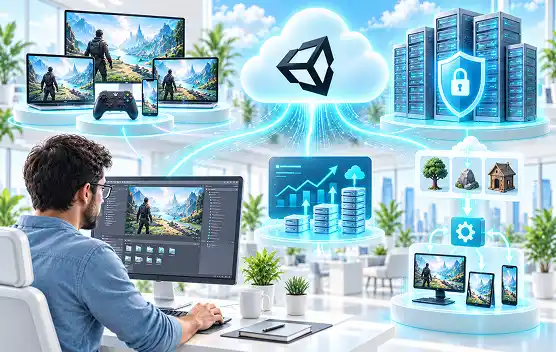
How Unity Fits into a Cloud-Based Game Development Workflow
- → Give developers, designers, and artists a central environment to manage project files, track changes, and collaborate across locations.
- → Automate the process of creating game builds for different platforms.
- → Run automated tests and validate builds in scalable environments.
- → Utilize cloud solutions to enable functionalities like APIs, backend game mechanics, player matching, and management.
- → Gather and examine gaming data to gain insights into player actions, recognize issues, and improve product choices.
- → Keep an eye on your game post-release, oversee events and updates, and react to player actions as your game develops.
7 Key Benefits of Cloud-Based Game Development with Unity
For you, the biggest value is not simply moving game workloads to the cloud. It is being able to build a game that can adapt as your team, player base, and business requirements grow. More than 70% of the top 1,000 mobile games are made with Unity, highlighting its strong presence across today’s gaming landscape.
Here are seven key benefits to consider:
1. Scale Your Game as Player Demand Grows
Your infrastructure grows with your player base in real time. Cloud infrastructure gives you more flexibility to scale resources based on demand.
- Scale server resources based on player demand.
- Handle sudden traffic and player spikes more easily.
- Expand your game without major hardware investments.
2. Support Rich Multiplayer Experiences
Dedicated cloud game servers can reduce lag and connection problems. This is especially important for multiplayer games where smooth and fair gameplay matters.
- Reduce lag and connection issues with dedicated servers.
- Keep game states consistent for all players.
- Deliver smoother and more reliable multiplayer gameplay.
3. Accelerate Development and Collaboration
Cloud-supported workflows can give your team shared access to development resources and make collaboration easier.
- Create builds for multiple platforms.
- Work with distributed development teams.
- Automate repetitive development tasks.
4. Faster Game Updates and Live Operations
Push a balance patch, a new event, or a bug fix without waiting on app store review cycles for every platform. Your live-ops team can react to player behavior in hours, not weeks.
- Push new content and features more quickly.
- Manage live events and game changes from the cloud.
- Keep your game fresh without major downtime.
5. Lower Infrastructure and Hardware Costs
You pay for server time you actually use instead of buying and maintaining physical hardware. For most studios, that shifts a large capital expense into a predictable operating cost.
- Reduce the need for expensive physical servers.
- Pay for cloud resources based on your usage.
- Avoid the cost of maintaining on-premises infrastructure.
6. Wider Player Accessibility
Cloud-based games can reduce hardware barriers for players. Instead of relying on powerful devices, players can access games through supported devices with a stable internet connection.
- Reduce the need for high-end gaming hardware.
- Let players access games across supported devices.
- Reach more players with cloud-enabled gaming experiences.
7. Centralized Player Data and Game Logic
Player progress, inventory, and core logic live on the server, not the device. That means no lost saves, harder-to-cheat systems, and analytics you can actually trust.
- Store player profiles and game progress in one place.
- Keep game data consistent across devices.
- Manage backend logic more efficiently from the cloud.
How Unity Supports Modern Cloud-Based Games
Unity Multiplayer Services
Relay, Lobby, and Matchmaker handle session discovery and connection routing, so your team isn't building multiplayer infrastructure from scratch.
Cloud Code and Backend Game Logic
Server-authoritative logic runs in the cloud rather than on the client, which closes off a major avenue for cheating and manipulation.
Cloud Save and Player Data
Progress syncs automatically across devices. A player can start on their phone and finish on a console without losing anything.
Cloud Content Delivery
CCD lets you push new levels, assets, or seasonal content without forcing a full app update, keeping your live content pipeline fast.
Game Server Hosting
Unity Multiplay handles dedicated server hosting and auto-scaling, so your dev team focuses on gameplay instead of server ops.
Cloud-Based Gaming Trends Shaping Game Development in 2026
Cross-Play and Multiplayer-First Experiences
Games are increasingly designed around shared sessions from the start, not bolted on after launch. This is one of the clearest cloud gaming trends heading into next year.
AI-Assisted Game Development
AI in game development now supports everything from asset generation and NPC behavior to QA testing and matchmaking. It helps studios reduce production time on tasks that once took weeks of manual effort.
Live Operations and Continuous Content
Games are shipping as ongoing services, with regular content drops replacing the old "launch and move on" model.
Smaller, Faster Game Development Cycles
Cloud-native tooling lets smaller teams ship and iterate faster, closing the gap between indie studios and larger publishers.
Cloud Observability and Performance Monitoring
Real-time monitoring of server load, latency, and player behavior is now essential. Cloud gaming technology helps teams spot and fix issues before players even notice them.
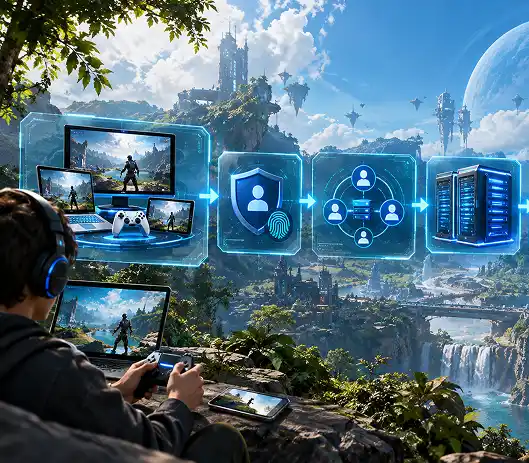
Cloud-Based Game Architecture: What Does It Look Like?
A typical cloud-based game architecture follows this flow:
Player Devices→Authentication→Matchmaking/Relay→Game Servers→Cloud Backend→Player Data / Analytics / Content Delivery
- Player Devices send inputs and receive the video or data stream.
- Authentication verifies identity and account access.
- Matchmaking/Relay connects players into sessions and routes traffic.
- Game Servers run the actual game logic and physics.
- Cloud Backend handles storage, saving states, and business logic.
- Player Data / Analytics / Content Delivery feeds back into live-ops decisions and future updates.
Challenges of Building Cloud-Based Games
01
Managing Latency and Network Performance
Every millisecond counts in competitive play. Server location and network routing decisions directly affect whether a game feels responsive or frustrating.
02
Controlling Cloud Infrastructure Costs
Auto-scaling cuts both ways. Without proper cost controls, a traffic spike can turn into a surprise bill.
03
Protecting Player Data and Game APIs
Server-side logic and stored player data are valuable targets. Security has to be built in from the start, not added after a breach.
04
Scaling During Traffic Spikes
Launch days and viral moments can multiply your player count overnight. Your infrastructure needs to be tested for that scenario before it happens live.
05
Maintaining Consistent Cross-Platform Experiences
Input methods, screen sizes, and performance vary wildly across devices. Keeping the experience fair and consistent takes deliberate design work.
06
Monitoring Multiplayer Infrastructure
Without real-time visibility into server health and player experience, small issues can snowball into churn before your team even notices.
Best Practices for Building Cloud-Based Games with Unity
- Design for cross-platform play from the start, not as a retrofit.
- Use server-authoritative logic for anything tied to progress, currency, or competitive fairness.
- Build your cost-monitoring and auto-scaling rules before launch, not after your first spike.
- Lean on Unity's Cloud Build and CCD to decouple content updates from full app releases.
- Test under real network conditions, not just on a studio's fast, stable connection.
- Bring in a Unity development partner who's already solved these problems, so your team isn't debugging cloud infrastructure for the first time in production.
Cloud-Based Games vs. Traditional Game Development
| Factor | Cloud-Based Game Dev | Traditional Game Dev |
|---|---|---|
| Hardware requirement | Runs on low-spec devices | Needs high-spec hardware |
| Deployment | Continuous updates, no app store wait | Manual builds per platform |
| Scalability | Auto-scales with player demand | Fixed capacity, hard to scale |
| Cost model | Pay-as-you-go operating cost | Upfront capital investment |
| Multiplayer | Server-authoritative, cloud-hosted | Often peer-to-peer, less reliable |
| Player data | Centralized, synced across devices | Often local, device-dependent |
| Market reach | Broader, hardware-agnostic | Limited by device ownership |
When Should You Choose Cloud-Based Game Development?
Cloud-based development makes the most sense when you need:
- A multiplayer or live-service game that has to scale unpredictably
- Cross-platform play as a core feature, not an afterthought
- Frequent content updates without long app store review cycles
- To reach players on lower-end or mobile devices
- Centralized player data for analytics, anti-cheat, or personalization
If your game is a small, single-player, offline experience, the overhead of cloud infrastructure may not pay off. For any multiplayer, live-service, or built to scale, it's close to a requirement.
How Chetu Can Help Build Cloud-Based Games with Unity
Your game needs more than a powerful engine. It needs an architecture that can support performance, multiplayer interactions, continuous updates, and growth after launch. Chetu combines Unity development expertise with cloud, AI, and backend capabilities to help you build games that are designed for both today's players and tomorrow's scale.
From concept to post-launch support, we deliver end-to-end game development services to help you:
- Build cross-platform Unity games
- Develop scalable multiplayer experiences with cloud networking and matchmaking.
- Integrate AI into gameplay for intelligent NPCs player personalization.
- Support your game beyond launch with performance optimization, feature enhancements, and ongoing maintenance.
Ready to turn your game idea into a scalable cloud experience?
Talk to our game development experts about building a cloud-based game using Unity. Let's scope your Unity build together and keep an eye on gameplay.
Frequently Asked Questions
Cloud-based game development offers five core benefits:
- Lower hardware requirements for players
- Automatic infrastructure scaling during demand spikes
- Faster updates without app store delays
- Reduced infrastructure costs through pay-as-you-go hosting
- Centralized, more secure player data
Yes, Unity is well-suited for cloud-based games. It offers built-in cloud tools, including Unity Multiplay for server hosting, Cloud Code for backend logic, and Cloud Content Delivery for pushing updates.
Yes, Unity supports multiplayer cloud games through its Relay, Lobby, and Matchmaker services. These tools handle session discovery, connection routing, and cross-platform matchmaking.
Cloud infrastructure helps games scale by automatically adjusting server capacity based on real-time player demand. This means a sudden spike in players doesn't crash the game, and unused server capacity doesn't sit idle and billed during quieter periods.
Unity offers several services for cloud-based games:
- Unity Multiplay for server hosting and auto-scaling
- Cloud Code for backend game logic
- Cloud Save for cross-device player data sync
- Cloud Content Delivery for live content updates
- Relay, Lobby, and Matchmaker for multiplayer connectivity
The cost of cloud-based game development varies based on game complexity, expected player volume, and infrastructure choices. Studios typically move from a large upfront hardware investment to a smaller, ongoing operating cost, making a detailed scoping session with a development partner the most reliable way to get an accurate estimate.
Disclaimer:
This content has been made available for information purposes only. Views and opinions expressed in this content are those of the individual author only and do not necessarily represent the opinions and views of Chetu. Chetu, and its representatives, make no representation or warranty of any kind, express or implied, regarding the accuracy, adequacy, validity, reliability, availability, or completeness of any information of this content. Under no circumstances shall Chetu, or its representatives, have any liability to you or any loss or damage of any kind incurred as a result of the use of this content or reliance on any information provided in this content. Your use of this website and your reliance on any information on this content is solely at your own risk.
About Chetu:
Founded in 2000, Chetu empowers businesses with AI and digital transformation solutions, supporting startups, SMBs, and Fortune 5000 companies. We deliver end-to-end software solutions backed by global digital intelligence and industry expertise. Our customized software delivery model and one-stop-shop approach span the full technology spectrum. Headquartered in Sunrise, Florida, Chetu operates 13 locations across the U.S., Europe, and Asia.
See more at: Chetu Blogs
Share


Limited Time Offer for a Free E-Book

Suggested
Reading
Read our blogs on automation strategies, technology and business solutions.